Tutorials
Playwright MCP Gives Your Agent a Real Browser (Microsoft's 39K-Star Server, Setup Inside)
Playwright MCP setup: Microsoft's MCP server lets an LLM drive a real browser through accessibility snapshots — no vision model, no screenshots.
Last updated: November 20, 2026 · 6-minute read
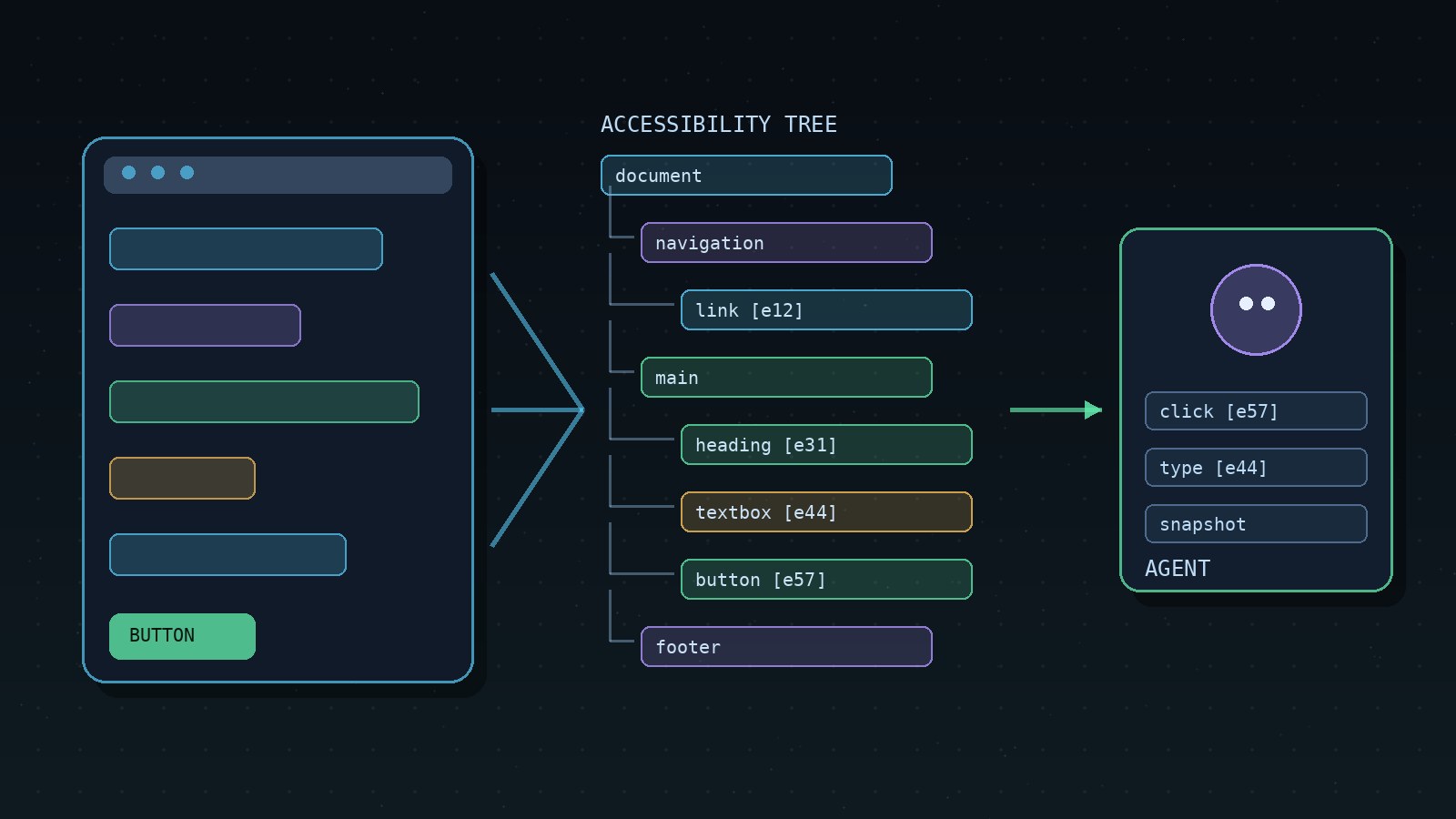
39,296 stars, and the design choice is the story. Playwright MCP is Microsoft's Model Context Protocol server for browser automation, and it does not show your agent a single screenshot. The agent reads the page as a structured accessibility tree, picks an element by its reference, and acts — clicks, typing, form fills — against that structure. No vision model, no pixel coordinates, no guessing where a button sits.
That choice decides everything else in this guide: what the server is good at, what it costs in tokens, and the honest case where Microsoft's own README will steer you to a different tool from the same team.
What Playwright MCP Actually Is
Playwright is Microsoft's browser automation library — the thing test suites use to drive Chromium, Firefox, and WebKit. Playwright MCP wraps that library as an MCP server: any MCP client (VS Code, Cursor, Claude Code, Claude Desktop, Goose, Codex, and more are listed in the README) connects, and the LLM gets browser tools over the protocol.
The README states the three design claims plainly:
- Fast and lightweight — it uses Playwright's accessibility tree, not pixel-based input
- LLM-friendly — no vision models needed; it operates purely on structured data
- Deterministic tool application — element references avoid the ambiguity of screenshot-based approaches
The core loop is one tool: browsersnapshot captures the page's accessibility snapshot, a text tree of elements, each carrying a reference. Action tools such as browserclick and browsertype take that exact reference as their target. The agent never describes a button as "the blue one near the top" — it names the node.
TL;DR
- Playwright MCP: 39,296 GitHub stars, Apache-2.0, from the Playwright team at Microsoft
- Agents drive a real browser through accessibility snapshots — structured text, not screenshots — so no vision model is required
- Setup is one config block: npx @playwright/mcp@latest, Node.js 18 or newer, works with the major MCP clients
- Core tools cover navigation, clicks, typing, forms, tabs, network inspection, and console messages; vision, PDF, and DevTools tool groups are opt-in
- The trade is tokens: snapshots and tool schemas enter the model context on every step
- Microsoft's own README points high-throughput coding agents at the Playwright CLI instead — read the caveats before choosing
Install It in One Config Block
The standard configuration works in most clients. Add this to your MCP settings:
Claude Code users get a one-line route instead:
Requirements are short: Node.js 18 or newer and an MCP client. The browser runs headed by default — you watch it work — and --headless switches that off. A Docker route also exists (mcr.microsoft.com/playwright/mcp), with one documented limit: the container supports headless Chromium only.
Three configuration decisions matter early:
Profile warning from the README: a persistent profile can be used by only one browser instance at a time. Run several MCP clients against the same workspace and they will conflict — give the extra clients --isolated or their own --user-data-dir.
The Tool Surface, in Groups
The core automation group is what most sessions use: browsernavigate, browsersnapshot, browserclick, browsertype, browserfillform, browserpresskey, browserselectoption, browserhover, browserdrag, browserfileupload, browserhandledialog, browsertabs, and browserwaitfor. Around that core sit inspection tools — browserconsolemessages for page errors, browsernetworkrequests for traffic, and browserevaluate for running JavaScript in the page.
Everything else is opt-in, enabled with --caps:
One detail worth noticing: screenshots exist (browsertakescreenshot), but the tool's own description tells the model to use browsersnapshot for actions by default. Vision is the fallback, not the plan.
Playwright MCP vs Playwright the Test Framework
This site has covered Playwright before, in a different job. The TestSprite comparison treated Playwright as a test framework: a human writes code, selectors rot as the UI changes, and maintenance follows. Playwright MCP is not that product with an AI sticker on it.
- Who acts: a test suite executes fixed steps a human wrote; an MCP session decides each step at runtime, from the current snapshot
- What breaks: written tests break when selectors change; snapshot-driven agents re-read the page every step, so a moved button is found again — the self-healing property the README names
- What it is for: regression suites want repeatability; MCP sessions fit exploratory automation, data extraction behind real interactions, and long-running flows where the next step depends on what the page shows
If you are building MCP servers yourself rather than consuming this one, the FastMCP guide covers the Python side of the same protocol.
Where It Falls Short
Microsoft's README argues against its own server in one specific, common case — credit to them for printing it.
- Token cost is structural. Every snapshot is text in the model's context, and the tool schemas load alongside it. The README's own comparison says coding agents increasingly favour the sibling Playwright CLI plus skills because CLI calls avoid loading large schemas and verbose accessibility trees. For a high-throughput coding agent working a large codebase, Microsoft recommends the CLI; MCP is positioned for persistent state, rich introspection, and long-running autonomous loops.
- The accessibility tree is a filter, not the page. Canvas-heavy apps, custom-drawn controls, and anything that does not expose proper roles can arrive as a thin or misleading tree. The vision capability exists precisely for those gaps — which reintroduces the screenshot workflow this server was built to avoid.
- Version numbers say pre-1.0. The latest release at the time of writing is v0.0.84 (October 31, 2026). The server is widely used and actively maintained, but the 0.0.x line is the project's own signal that interfaces can still move.
- A logged-in browser is a loaded tool. The default persistent profile carries your real sessions. An agent that can click anything in a browser where you are signed in deserves the same supervision as a script with your cookies — start with --isolated for untrusted tasks.
- Headed by default. Fine on a desktop; on a server or in CI you must remember --headless, and the Docker image only supports headless Chromium.
The Verdict
Playwright MCP is the right shape for agent browsing: pages as structure, actions against references, inspection tools beside the action tools. For exploratory automation, research tasks, and flows where the page decides the next step, it beats handing a vision model a stream of screenshots.
If your agent is a coding agent churning through a repo, take Microsoft's own advice and evaluate the CLI route on token cost. If your agent needs to live in a browser — persistent state, iterative reasoning over page structure — this server is the mature option, and 39,296 stars of adoption say the shape works.
More agent infrastructure lives in the FastMCP server guide, and the rest of the toolkit is on the projects page and in the blog archive.
---
Not affiliated with Microsoft or Playwright. Sources: Playwright MCP GitHub repository, Playwright MCP README and tool reference, Playwright CLI.