Tutorials
LosslessCut Trims Video Without Re-Encoding (The 45.8K-Star Swiss Army Knife, Honest Limits)
LosslessCut guide: trim, merge, and remux video in seconds with no re-encode — plus the keyframe limit the docs state plainly and when ffmpeg still wins.
Last updated: November 21, 2026 · 6-minute read
45,786 stars, ten years of releases, one maintainer. LosslessCut is a graphical front end over FFmpeg built for one idea: most video trimming does not need to re-encode anything. It copies the existing streams — a near-direct data copy — so cutting the good ten minutes out of a two-hour recording takes seconds, costs zero quality, and leaves the original file untouched. The current release is v3.70.2, from October 28, 2026. This guide covers what it does, and then spends real time on the one limit that decides whether it fits your footage: a lossless cut can only start where the file lets it.
The use case the README leads with is the camera-roll problem: a GoPro, drone, or camera file that is mostly discardable gigabytes. Rough-cutting it in a normal editor means importing, rendering, and generational quality loss. Rough-cutting it here means the output is bit-identical inside the kept range, because nothing was decoded and re-encoded at all.
What It Does Beyond Trimming
The feature list is wider than the name suggests:
- Cut and merge — trim segments out of one file, or merge whole files with identical codecs, all losslessly
- Remux — change the container (MKV to MP4, say) without re-encoding
- Track surgery — add, remove, replace, or extract audio, subtitle, and other tracks
- Detection — split by scenes, black frames, or silence
- Structure — segments, markers, and tags, with chapter import/export and CSV/EDL exchange
- Metadata and rotation editing, snapshots and frame export
- A CLI and an HTTP API beside the GUI, for scripted use
Format support runs through the Chromium player for common containers and codecs (MP4, MOV, WebM, Matroska, OGG, WAV; H.264, AV1, VP8/VP9, H.265 with hardware decoding), with FFmpeg-assisted playback for files outside that set. The export still reads the original file either way, so playback support and export support are separate questions — a useful distinction the docs make clearly.
TL;DR
- LosslessCut: 45,786 GitHub stars, GPL-2.0, an FFmpeg GUI for lossless trim, merge, remux, and track work
- Cuts are stream copies: seconds instead of renders, and zero quality loss inside the kept range
- The hard limit, from the project's own docs: a lossless start cut lands on the nearest previous keyframe — sparse-keyframe files can export starting seconds early
- Smart cut (experimental) re-encodes only the sliver up to the next keyframe for frame-accurate starts, and does not work for many files
- Merging demands identical codec parameters across files; a compatibility check warns about mismatches
- Free direct downloads forever, per the maintainer; app-store versions are the paid convenience route
The Keyframe Limit, Stated Plainly
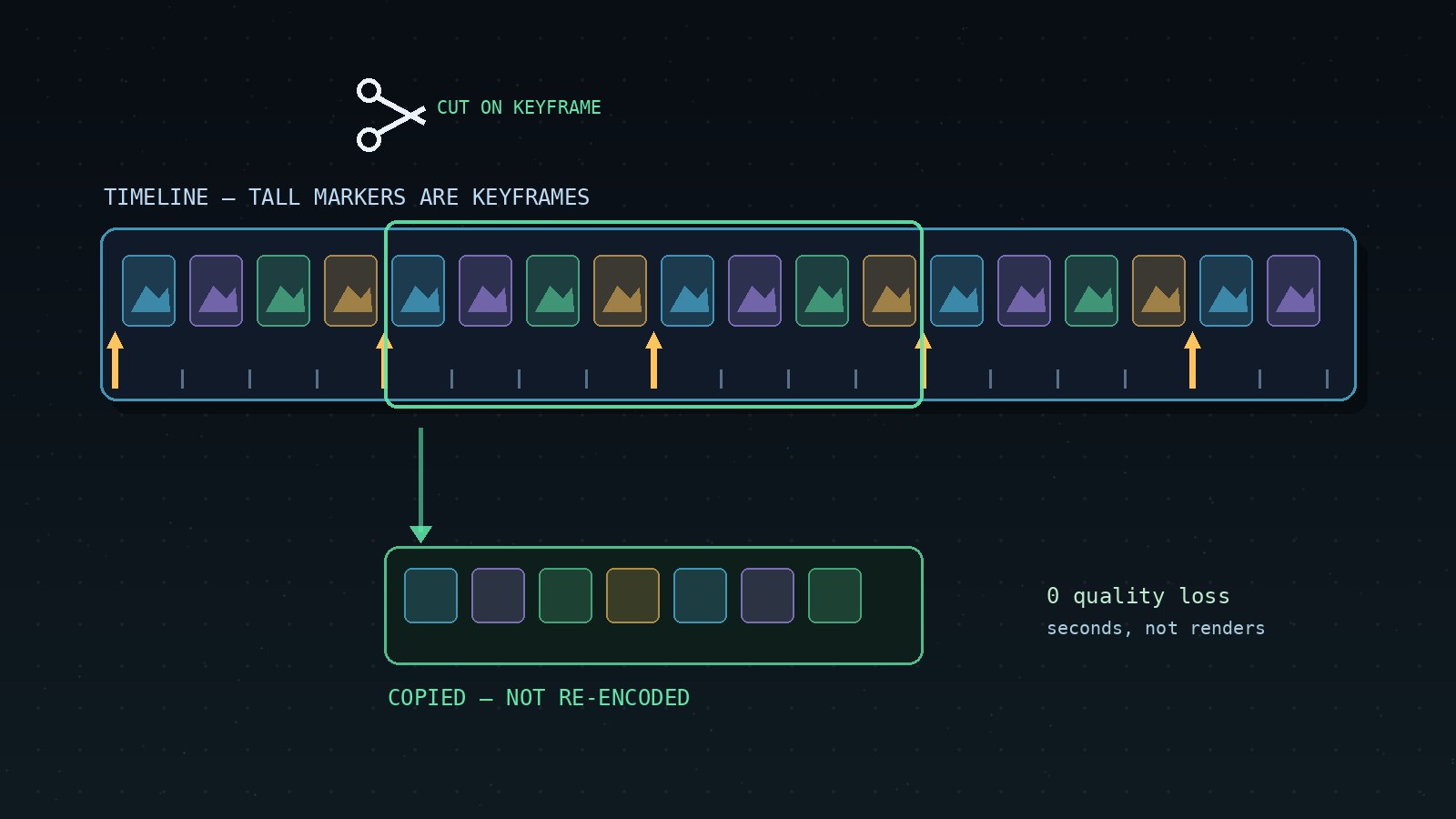
Video is stored as keyframes — complete pictures — followed by frames that only record changes from the picture before. A stream copy cannot invent a starting picture, so with Keyframe cut mode (the default), the docs state that a segment's start is rounded to the nearest previous keyframe. The consequences, all from the project's troubleshooting documentation:
- If your file has a keyframe every 5–10 seconds — common in screen recordings and some camera footage — an export can begin several seconds before the cut point you picked
- The documented fix is craft, not settings-hunting: place start points on, or a few frames after, a keyframe. Keyframes show as vertical lines on the timeline; there are seek-to-keyframe shortcuts and a command to align all segment times to keyframes
- Smart cut (experimental, in the export options) re-encodes only the stretch from your cut point to the next keyframe, giving a frame-accurate start with a mostly-lossless file. The docs are blunt that it will not work for many files
- And the underlying truth, in the docs' own framing: frame-accurate cuts at any position are not possible without re-encoding. Any tool that promises otherwise is re-encoding and not telling you
None of this is a defect in LosslessCut; it is the physics of the format, and this project's documentation is unusually honest about it. It does mean the tool fits some footage better than others: densely-keyframed camera originals cut beautifully, while a long-GOP screen capture may need the Smart cut workaround or a different tool for one precise cut.
LosslessCut or the ffmpeg Command Line?
Both are the same engine. This site's ffmpeg cheatsheet covers the command-line route; here is the honest division of labour:
The one-sentence rule: if you are looking at the footage while deciding, use LosslessCut; if you already know the timestamps, use ffmpeg.
Where It Falls Short
- The keyframe ceiling is real. However friendly the interface, a start cut seconds early is a start cut seconds early, and Smart cut is labelled experimental by its own author because it is.
- Merging is stricter than it looks. Files must share codec, resolution, pixel format, frame rate, and audio parameters; mixed sources merge into corrupt output, and the compatibility check catches many mismatches, not all — the docs say so.
- It is a one-person project. The maintainer writes that LosslessCut is "maintained by me alone" and will always remain free and open source. A decade of releases (the repo dates to October 2016) makes that a credible promise — and a bus factor of one is still a fact to know before building a workflow on it.
- GPL-2.0 travels with the code. Free to use, including at work; but anyone redistributing a modified build inherits copyleft obligations. Worth one line because teams do embed tools like this into pipelines.
- Free has two doors. Direct downloads from GitHub are free; the Mac and Windows app-store versions cost money and buy automatic updates plus support for the maintainer. The FAQ documents the split — neither door is a trick, but pick knowingly.
The Verdict
LosslessCut earns its Swiss-army-knife tagline the honest way: one fast tool for the dozen small video jobs that should never require a full editor or a render queue. For trimming recordings, merging same-camera clips, remuxing containers, and stripping tracks, it is close to instant and exactly lossless.
Respect the keyframe limit and it will not surprise you: cut on keyframes for pure copies, accept the small re-encode of Smart cut when a precise start matters, and drop to ffmpeg when the job repeats. Ten years in, this is what a finished open-source tool looks like.
The command-line half of this pairing is the ffmpeg cheatsheet, and the rest of the toolkit is on the projects page and in the blog archive.
---
Not affiliated with the LosslessCut project or the FFmpeg project. Sources: LosslessCut GitHub repository, LosslessCut documentation and troubleshooting guide, LosslessCut FAQ.