Insights
Actual Budget: Local-First Money Tracking That Never Phones Home (What You Give Up vs the Cloud Apps)
Actual Budget is a local-first envelope budgeting app: data on your devices, optional self-hosted sync, end-to-end encryption — and no built-in bank feeds.
Last updated: November 20, 2026 · 6-minute read
30,056 stars for a budgeting app with no cloud, no account to create with the vendor, and no automatic bank feed in the box. Actual Budget is a local-first personal finance app — your budget file lives on your devices, syncs only to a server you run, and can be end-to-end encrypted so even that server cannot read it. The title of this post says it never phones home, and that needs one precise footnote, given in full below: the app itself has no home to phone. What leaves your machine goes where you point it, and the bank-connection story is more conditional than the marketing of either fans or critics suggests.
This is an Insights piece, not a setup tutorial: the interesting question is what the local-first trade actually costs in daily use, judged from the project's own documentation.
The Method: Envelopes, With Every Rupee Assigned
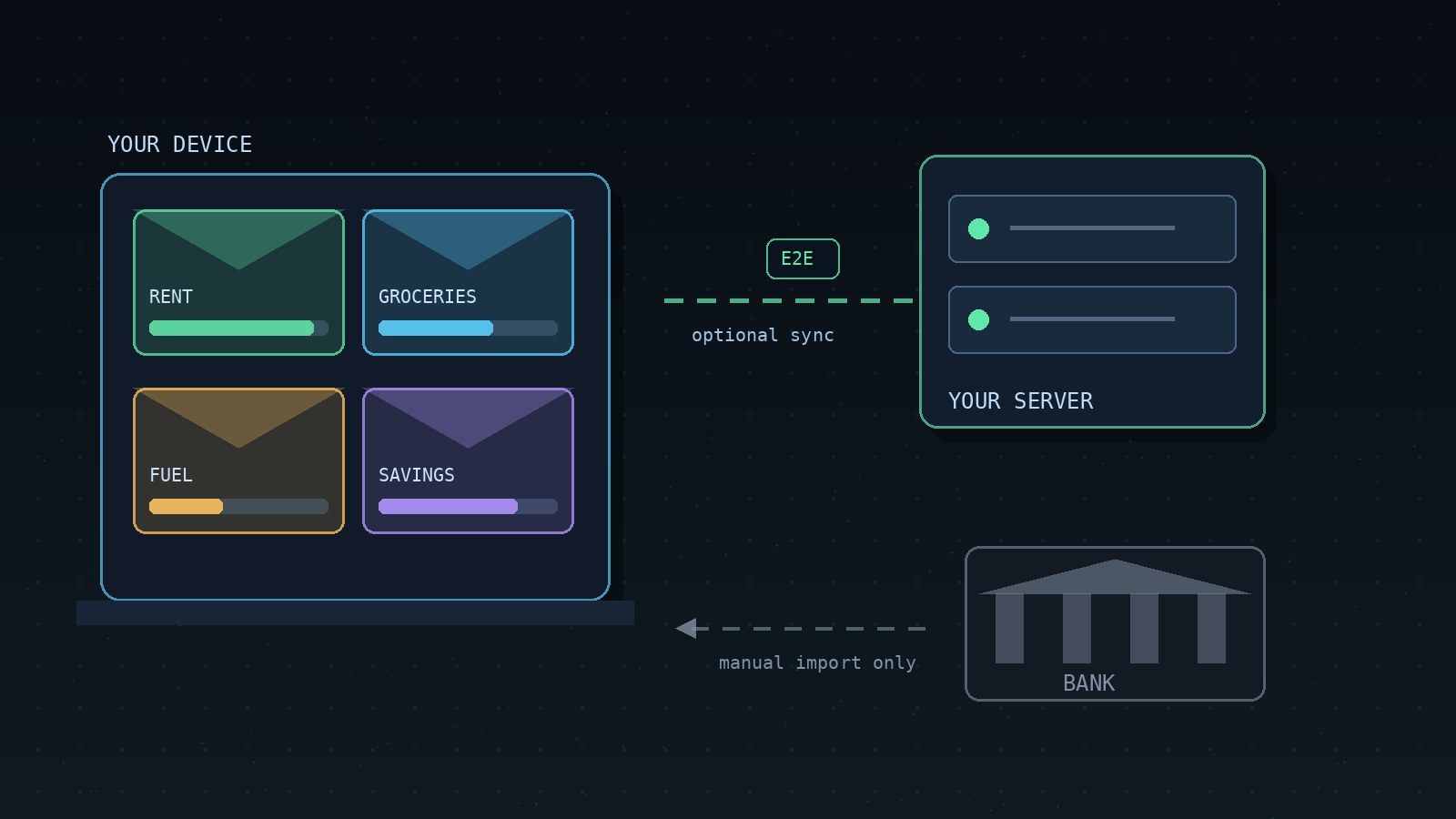
Actual implements envelope budgeting, the cash-in-envelopes method rebuilt as software. Categories are the envelopes — groceries, rent, fuel, savings — and each unit of income is allocated to exactly one category, a principle the docs call zero-sum budgeting: every dollar (or rupee) gets a job, and no money sits unallocated. Unlike the paper version, fixed expenses are first-class: rent, utilities, and subscriptions are categories alongside the flexible ones, and schedules, rules, payee management, and reports sit around the core ledger.
Nothing about the method is new, and the docs do not pretend otherwise. The software's job is to make the discipline cheap to keep: balances per envelope, always current, on every device you own.
The Architecture: Local First, Really
The sync documentation describes the model in one move: Actual stores all of your data on your local device and on your installed server, works regardless of network connection, and your data never goes to external servers you do not choose. Read that against the cloud-app default — data on the vendor's servers, the app a window into it — and the inversion is total:
- No server at all is a valid setup: desktop app, local file, done
- Your server (the open-source actual-server, run via Docker, Fly.io, PikaPods, or from source, per the install docs) adds multi-device sync in the background
- End-to-end encryption is an optional layer on top: a key derived from a second password encrypts data before it leaves the device, so the server passes around changes it cannot read
That last option comes with the sharpest honest warning in the docs: if you lose your local copy and forget the encryption password, the data is unrecoverable — and enabling encryption is one-way. The docs also note your local copy stays unencrypted on disk, and recommend full-disk encryption alongside. Local-first privacy is a system property, not a toggle, and the documentation treats it that way.
TL;DR
- Actual Budget: 30,056 GitHub stars, MIT licence, current release v26.11.0 — a local-first envelope budgeting app
- Data lives on your devices; sync is optional and only to a server you run; end-to-end encryption is available and irreversible
- There is no built-in automatic bank feed: the default routes in are file import (QIF, OFX, QFX, CSV) or manual entry
- Optional bank sync exists through third-party aggregators with your own credentials — SimpleFIN for North America, GoCardless for Europe (closed to new sign-ups since July 2025), Pluggy for Brazil — and even then, fetching is a manual click, never automatic
- What you give up versus cloud apps: hands-free transaction inflow, a vendor to recover your account, and someone else to blame for backups
The Bank Question, Precisely
This is where coverage of Actual usually gets sloppy in both directions, so here is exactly what the project's bank-sync documentation says.
The core app has no automatic bank downloading. The importing guide lists the routes in: download a file from your bank (QIF, OFX, or QFX, with duplicate detection that works best off the IDs those formats carry), import a mapped CSV, or type transactions in. That is the whole default story.
An optional integration layer exists, with conditions. Bank sync requires running actual-server, and it works by you bringing API credentials from an aggregator:
Two more conditions matter. The sync is pull-only and manual — the docs state outright that Actual does not sync bank data automatically; you click Bank Sync when you want new transactions. And because your aggregator secrets get stored in your installation, the docs recommend turning on end-to-end encryption with a strong passphrase if you use it.
So the honest summary is narrower than both slogans. Fans saying "Actual has bank sync now" skip the aggregator account, the regional limits, the dead GoCardless sign-up door, and the manual click. Critics saying "you must type everything by hand" skip that file import is a two-minute monthly habit and that the aggregator route exists at all. For a reader in India, note the gap in the table: no listed aggregator covers Indian banks, so file import or manual entry is the realistic route — the local-first trade in its purest form.
Where It Falls Short
- The inflow habit is yours to keep. Cloud apps sell invisibility: transactions appear, categories guess themselves. Actual's cleanliness is bought with a recurring chore — an import file, a sync click, or manual entry — and a budget abandoned for two months is a budget with a two-month hole.
- Recovery is your problem. No vendor support desk can reset your way back into an encrypted file. The encryption docs are blunt about permanent loss, and sync resets, backups, and restores are documented procedures you operate yourself.
- Sync is a server you now maintain. Optional, yes — but the moment you want phone-plus-laptop budgeting, you are running actual-server, updating it, and owning its uptime. The project's current release cadence (v26.11.0 shipped November 2, 2026) means updates arrive often.
- "Never phones home" has edges. The app ships no vendor cloud, but the optional paths — your sync server exposed to the internet, an aggregator holding your bank credentials — reintroduce third parties by your own choice. The architecture gives you the decision; it does not make the decision safe by default.
The Verdict
Actual Budget is the budgeting app for people who have decided their financial data is theirs in the literal, on-disk sense. The envelope method is well implemented, the sync and encryption design is documented with unusual honesty, and the MIT licence plus a 30,056-star community make it a durable piece of software rather than a weekend project.
Choose it with eyes open: you are trading the cloud apps' invisible inflow and account recovery for ownership, and for most people that trade is decided by one question — will you actually do the monthly import? If yes, very little else in this category respects your data the way Actual does. If no, a cloud app you keep using beats a private app you abandon.
More self-hosted staples from this week: Immich for photos, and the rest of the toolkit is on the projects page and in the blog archive.
---
Not affiliated with Actual Budget, SimpleFIN, GoCardless, or Pluggy. Sources: Actual GitHub repository, Actual documentation — syncing and end-to-end encryption, bank sync documentation, importing transactions, envelope budgeting.