Builds
Stoppage-Free Multi-LLM TUI with Cascading Fallbacks
Build a Node.js reverse proxy that streams Codex CLI and cascades across Cerebras, Groq, Google, and OpenRouter for stoppage-free agent execution.
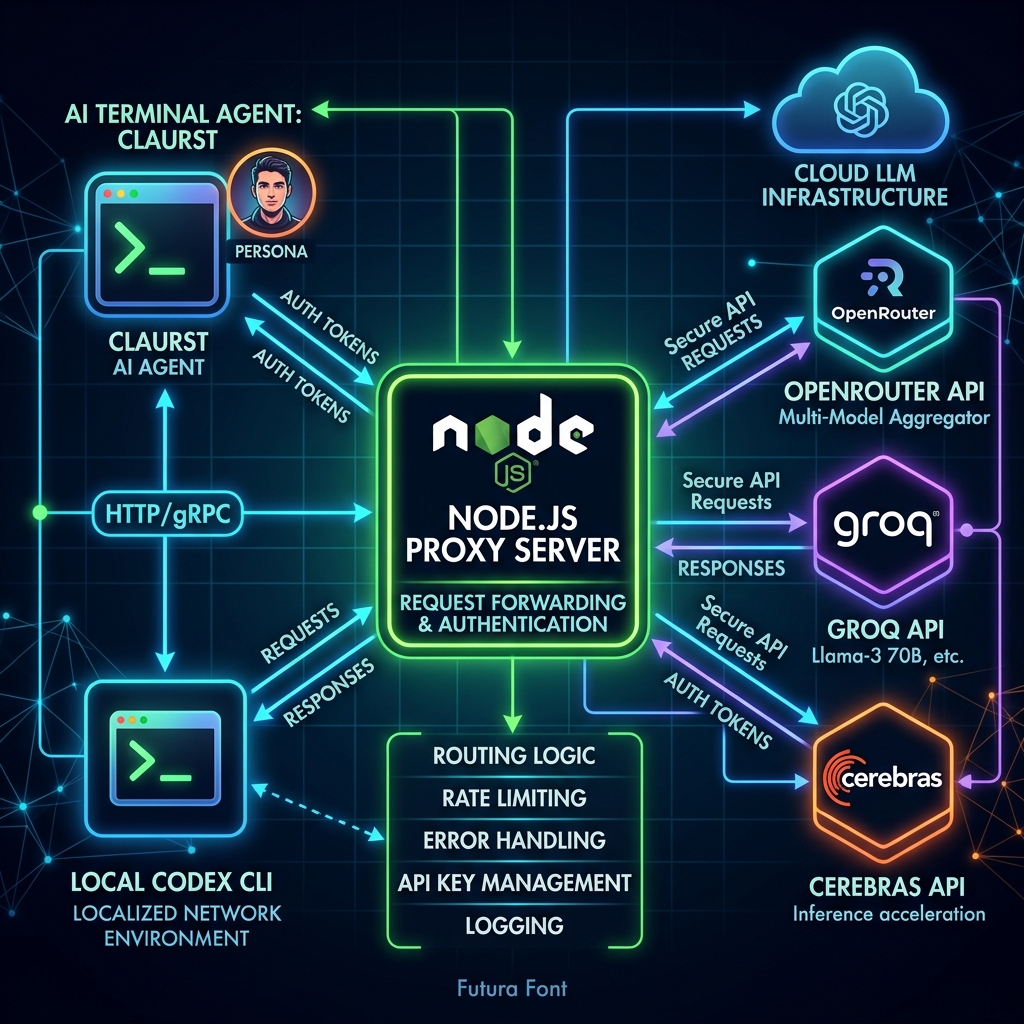
Last updated: July 12, 2026 · 15-minute read
Imagine running a high-performance, terminal-native AI coding agent without ever encountering rate limits, billing blocks, or sudden API failures.
In this developer deep dive, we walk through how we solved execution stoppages for the Rust-based AI agent Claurst (CLUASTE) by building a custom Node.js reverse proxy. This proxy intercepts OpenAI-compatible request payloads, dynamically redirects the primary execution through the user's local Codex CLI (tapping into their active ChatGPT Plus/Team subscription quota), and falls back seamlessly across a cascading chain of premium and free APIs (Cerebras, Groq, Google Gemini, and OpenRouter).
Here is the exact blueprint, architecture, commands, and code used to implement this stoppage-free development workflow.
---
The Architecture: Codex-Backed Reverse Proxy Flow
Terminal-native agents like Claurst execute actions in loops (reading files, executing commands, checking errors). If the LLM rate-limits or stops mid-task, the entire agent execution breaks.
By introducing a local proxy server listening on port 8000, we intercept the standard /v1/chat/completions API calls and pipe them dynamically based on credentials availability and service health.
Here is the exact request flow inside the proxy:
---
Tool & Component Breakdown
### 1. Claurst (CLUASTE) What it is: A terminal-native coding agent written in Rust, offering a high-performance ratatui-based interface. It runs agentic tool loops to read/write files and execute shell commands. The Problem: Default configurations hit rate limits quickly on free/low-tier API keys, terminating complex coding operations mid-run.
### 2. Codex CLI (@openai/codex) What it is: OpenAI's official command-line interface helper. It hooks directly into your browser-authenticated ChatGPT account. The Opportunity: ChatGPT Plus/Team/Enterprise accounts have extremely high, practically \"unlimited\" usage limits for coding tasks, but Codex is designed as an interactive CLI, not an API endpoint.
### 3. Fallback Providers Cerebras: Low-latency inference platform hosting zai-glm-4.7. Groq: LPU-powered inference hosting fast opensource models like llama-3.3-70b-versatile. OpenRouter (9 router or openrouter\): API aggregator providing access to diverse models, including a selection of high-quality free tiers (like google/gemini-2.5-flash:free).
---
Step-by-Step Implementation
### Step 1: Upgrading the CLIs to the Latest Releases To ensure maximum compatibility and tap into newer reasoning-effort models, we upgraded the global tools under the active Node environment.
## Upgrade Claurst bin natively & "C:\Users\My PC\.claurst\bin\claurst.exe" upgrade --force
Versions Verified: codex-cli: 0.142.5 opencode-ai: 1.17.13 claurst: 0.1.6
---
### Step 2: Intercepting the Agent Loop in Claurst Settings Claurst's configuration is modified to point its OpenAI-compatible provider config to our local proxy port:
~/.claurst/settings.json json { "config": { "provider": "custom-openai", "providerconfigs": { "custom-openai": { "apikey": "dummy-key-to-bypass-validation", "apibase": "http://127.0.0.1:8000/v1", "enabled": true } } } }
---
### Step 3: Implementing the Codex-to-OpenAI Stream Adapter Since Codex CLI accepts standard stdin input and prints events in JSONL format, the Node.js proxy spawns Codex as a child process, feeds it the compiled conversation history, reads the output, and transforms the JSONL events into standard OpenAI chunk stream structures (text/event-stream).
Here is the production-grade reverse proxy script:
C:\Users\My PC\.claurst\proxy.js javascript const http = require('http'); const https = require('https'); const { spawn } = require('childprocess'); const fs = require('fs'); const path = require('path');
console.log('Starting Claurst Codex/Multi-LLM Proxy...');
// 1. Load active credentials from auth.json const authPath = path.join(process.env.USERPROFILE, '.claurst', 'auth.json'); let cerebrasKey = ''; let groqKey = ''; let googleKey = ''; let openrouterKey = '';
try { const authData = JSON.parse(fs.readFileSync(authPath, 'utf8')); const creds = authData.credentials; if (creds.cerebras && creds.cerebras.key) cerebrasKey = creds.cerebras.key; if (creds.groq && creds.groq.key) groqKey = creds.groq.key; if (creds.google && creds.google.key && creds.google.key !== 'PASTEYOURGEMINIAPIKEYHERE') { googleKey = creds.google.key; } if (creds.openrouter && creds.openrouter.key && creds.openrouter.key !== 'PASTEYOUROPENROUTERAPIKEYHERE') { openrouterKey = creds.openrouter.key; }
console.log('Loaded credentials:'); console.log(- Cerebras: \${cerebrasKey ? 'Available' : 'Not Set'}); console.log(- Groq: \${groqKey ? 'Available' : 'Not Set'}); console.log(- Google Gemini: \${googleKey ? 'Available' : 'Not Set'}); console.log(- OpenRouter: \${openrouterKey ? 'Available' : 'Not Set'}); } catch (e) { console.warn('Failed to load credentials:', e.message); }
// 2. Generic HTTPS request forwarder for fallback APIs function forwardRequest(hostname, path, apiKey, body, res, next) { const bodyStr = JSON.stringify(body); const options = { hostname, port: 443, path, method: 'POST', headers: { 'Content-Type': 'application/json', 'Authorization': Bearer \/assets/blog/apiKey } };
if (body.stream) { options.headers['Accept'] = 'text/event-stream'; }
if (hostname === 'openrouter.ai') { options.headers['HTTP-Referer'] = 'https://github.com/Kuberwastaken/claurst'; options.headers['X-Title'] = 'Claurst Local Proxy'; }
const req = https.request(options, (targetRes) = { const status = targetRes.statusCode; if (status !== 200) { let errBody = ''; targetRes.on('data', (c) = errBody += c); targetRes.on('end', () = { next(Request to \/assets/blog/hostname failed with status \/assets/blog/status: \/assets/blog/errBody); }); return; } res.writeHead(status, targetRes.headers); targetRes.pipe(res); });
req.on('error', (err) = { next(Network error connecting to \/assets/blog/hostname: \${err.message}); });
req.write(bodyStr); req.end(); }
// ... remaining setup script